Choosing a Sampling Session
All about the different session modes available for the FIDO sensor, and when to use them
Written By Gareth Lloyd
-
FIDO sensors take multiple acoustic recordings at intervals for extra reassurance that leak noises are there consistently. These sets of recordings are called sessions and there are different types of session available depending on how many recordings, how often and at what time of the day you want the FIDO sensors to take samples.
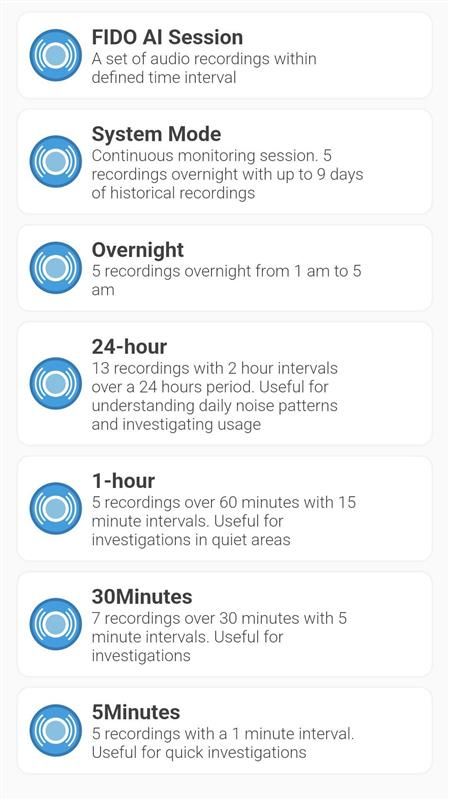
Here is a list of the session types available in the app. You can find this list by tapping the ‘?’ icon on the app home screen and then clicking ‘Sessions’.
Session Results Graphs
When you upload the data and recordings from any completed session, FIDO AI will give you a results graph. These graphs are sometimes referred to as pollen graphs. They show the noise profile of every recording the sensor took in the session, as well as which was the loudest and which one was the quietest. They also show which noises were present across all the samples in the session.
Below is an example of a results graph from a 5-minute session. It shows five graphs side by side, one from each of the five separate recordings taken during the session. The loudest recording is the darkest one. The pale yellow bars running across all the samples show which parts of the noise were consistent across all the samples, and the frequencies these occurred at. This is important because leak noises are always consistent. FIDO AI only analyses these noises.

Choosing Which Session to Use
You can select which session you want a FIDO sensor to use from a drop down menu on the ‘New session’ page in the app whenever you deploy it. The session type you choose will depend on the task you’re carrying out and the environment the sensor is in. Let’s have a look at them all.
System mode
System mode is the default setting for your FIDO sensor and the the one you always use for fixed or long term network monitoring. You always use System mode if you are using a FIDO Relay device. In System mode, FIDO sensors record five noise samples every night between 1am and 5am and store up to 10 nights worth of recordings on a rolling basis. This gives you the most accurate leak detection.
24-hour sessions
These sessions start on the hour after you press ‘Confirm’ on the ‘New session’ page, e.g. if you set up the sensor at 10:03, the session will commence at 11:00. In 24-hour mode, the FIDO sensor will take a 5 second recording every two hours for the next 24 hours. Once the data is uploaded, FIDO AI will give you a leak determination based on its analysis. These sessions can be incredibly useful for working in noisy environments like near a PRV. They let you see how a noise persists throughout the day and night and gives you a good sense of whether or not there is something going on when the PRV is relatively quieter through the night.
Overnight sessions
These sessions start recording at 01:00am the day after you press ‘Confirm’. In Overnight mode, the FIDO sensor will record a a total of five recordings at 1, 2, 3, 4 and 5am. This session will again give you a FIDO AI leak determination. Overnight sessions are ideal for working in high usage areas. They let you see if a noise persists through the night at low usage times without the need for a night team to investigate.
Shorter sampling sessions
The following three session types will you NOT give you a leak determination because they are too short. We believe that shorter durations exaggerate the impact of acoustic variables and can reduce accuracy. However, they are very useful for being able to check the presence of noises, and noise consistency at multiple locations efficiently. They can be used to assess if and where longer sessions would most usefully be carried out.
5-minute: This is the shortest session. It starts 60 seconds after you press ‘Confirm’ on the ‘New session’ page. In 5-minute mode, the FIDO sensor will record a 5 second sample every minute for 5 minutes.
30-minutes: The FIDO sensor will take 7 recordings over a 30 minute period starting 60 seconds after after you press ‘Confirm’.
1-hour: The FIDO sensor will take 5 recordings over a one hour period starting 60 seconds after after you press ‘Confirm’.
Was this helpful?
Still need help? Ask the team